
To support the long-term stability, performance and sustainability of Learning Space (Moodle), the University is introducing a formal course lifecycle and archiving process from August 2026.
Over a number of years, Learning Space has accumulated large volumes of historical courses, backups and media files. While older courses can provide useful reference material, Learning Space is primarily intended to support active teaching, learning and assessment. It is not designed to function as an indefinite repository for historical courses, assessment submissions, or large media files.
The new approach will establish a clear and consistent process for retaining, archiving and eventually deleting older courses, while ensuring that current teaching and assessment activity remains fully supported.
Contents
- What is changing?
- Why is this change being made?
- Managing teaching materials
- New file upload limits
- Course lifecycle, archiving and deletion
- Actions taking place in 2026
- Key implementation Dates
What is changing?
Under the new course lifecycle model:
- Current academic year courses will remain fully active for staff and students.
- The previous two academic years of courses will remain available for reference and normal academic use.
- Courses aged 3–5 years will be moved to an archive state and hidden from staff and students.
- Courses older than 6 years will be permanently deleted in line with institutional retention requirements.
Why is this change being made?
The changes will:
- Improve the stability and performance of Learning Space.
- Reduce the risk of service disruption caused by increasing storage demands.
- Introduce a clear and consistent approach to course retention and archiving.
- Support the use of Learning Space as an active teaching and assessment environment rather than a long-term storage repository.
- Replace periodic large-scale clean-up activities with a predictable annual lifecycle process.
Managing teaching materials
Where older resources remain useful, staff should review whether they need to be retained and, where appropriate, move them to an institutional platform designed for long-term storage and reuse, such as OneDrive or Panopto.
While archived courses may contain useful historical material, good practice is to review, update, and retain teaching content within live modules rather than rely on continued access to courses that are several years old.
Key archiving and deletion dates are published in the schedule below. Staff are encouraged to review older courses in advance and identify any materials they wish to retain before the relevant archiving or deletion date.
New file upload limits
As part of this work, the maximum file upload size in Learning Space will be reduced from 1GB to 500MB for both staff and student uploads. This change will take place 26 August 2026.
Most documents, presentations and assessment submissions will not be affected by this change. However, very large video files and media rich projects may exceed the new limit. For large files, both staff and students should use University approved services designed for this purpose, such as:
- Panopto for video content.
- OneDrive for large documents, portfolios and other files.
Links to content stored in these services can then be shared through Learning Space where appropriate.
This change supports the role of Learning Space as a teaching and assessment platform while ensuring that large media files are stored in systems specifically designed for long-term content storage and delivery.
Course lifecycle, archiving and deletion
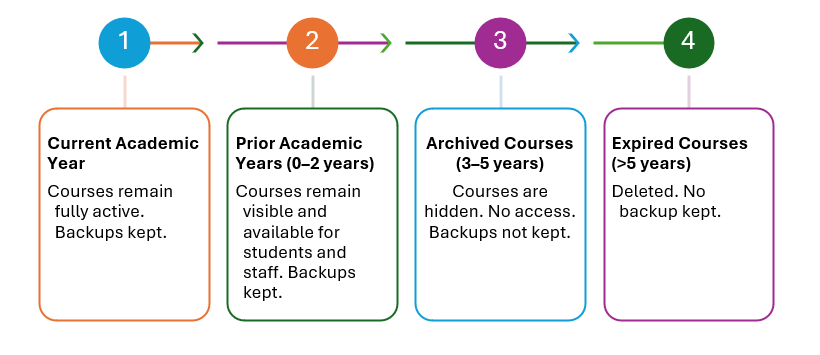
The course lifecycle will follow this model:
- The current academic year – courses remain fully active. Backups are kept.
- Prior academic years (0-2 years) – courses remain visible and available for students. Backups are kept.
- Archived courses (3-5 years) – courses are hidden with no access for students or staff. Backups are not kept.
- Expired courses (> 5 years) – courses are deleted permanently. Backups are not kept.
This model ensures that courses do not persist indefinitely and that storage reduces predictably over time.
Actions taking place in 2026
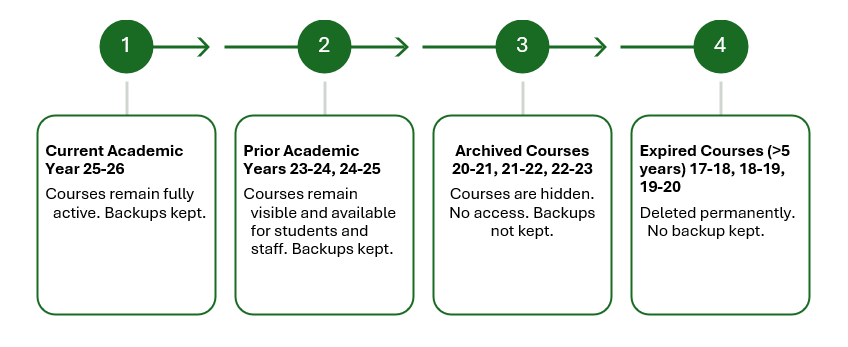
The actions taking place in 2026 are:
- Current academic year 2025–26 – courses remain fully active and backups are kept.
- Prior academic years 2023–24 and 2024–25 – courses remain visible to staff and students and backups are kept.
- Archived courses 2020–21, 2021–22 and 2022–23 – courses are hidden, access is removed and backups are not kept.
- Expired courses 2017–18, 2018–19 and 2019–20 – courses are permanently deleted and no backups are retained.
Key Implementation Dates
| Date | Action |
|---|---|
| 3 August 2026 | Expired courses (17-18, 18-19 and 19-20) are made visible for staff. This is to identify and recover any content they wish to keep in their OneDrive folders or in Panopto. |
| 22 September 2026 | Year 17-18 will be closed for access and scheduled for immediate deletion. |
| 13 October 2026 | Year 18-19 will be closed for access and scheduled for immediate deletion. |
| 3 November 2026 | Year 19-20 will be closed for access and scheduled for immediate deletion. |
| 1 February 2027 | Year 23-24 will be moved to archived state with no access to staff or students. |
| 1 July 2027 | Expired year 20-21 will be made visible for staff. This is to identify and recover any content they wish to keep in their OneDrive folders or in Panopto. |
| 1 September 2027 | Year 20-21 will be closed for access and scheduled for immediate deletion. |
| 1 February 2028 | Year 24-25 will be moved to archived state with no access to staff or students. |
| 1 July 2028 | Expired year 21-22 will be made visible for staff. This is to identify and recover any content they wish to keep in their OneDrive folders or in Panopto. |
| 1 September 2028 | Year 21-22 will be closed for access and scheduled for immediate deletion. |
| 1 February 2029 | Year 25-26 will be moved to archived state with no access to staff or students. |
| 1 July 2029 | Expired year 22-23 will be made visible for staff. This is to identify and recover any content they wish to keep in their OneDrive folders or in Panopto. |
| 1 September 2029 | Year 22-23 will be closed for access and scheduled for immediate deletion. |
The key implementation dates table will be updated accordingly in future years.
 Further Support
For any other comments or issues within this guide, please contact the Digital Learning Team via dlsupport@falmouth.ac.uk.
View the Accessibility Statement for all of our support guides.